What keeps a clinic director up at night? It’s not just patient care. It’s HIPAA compliance. You want to launch a mobile medical unit, but new fears stop you.
What about medical records storage? You’re picturing unstable Wi-Fi in a rural county, but you’re also picturing patient clipboards left on a counter. How do you secure laptops? How do you lock up paper charts? The gap between your mission and a data breach feels huge. A single unlocked cabinet or unsecured laptop means losing the trust of the very community you’re trying to build.
We get it. Our team at AVAN Mobility has helped organizations navigate challenges like these for over 10 years, building over 150 mobile medical units designed to save lives. We’ve helped partners like Siskiyou County and Pacific Clinics launch their programs. Our team takes the time to understand your program, your patients, and your goals. This isn’t off-the-shelf. It’s built around you. While we’re proud of our work, our main goal is to give you the facts.
This article will help you understand mobile medical records storage in a mobile clinic. We will answer your biggest questions, including:
- How does secure medical records storage work in a mobile clinic?
- What are the options for locking cabinets and physical files?
- What are the differences between cloud-based and physical records?
How does secure medical records storage work in a mobile clinic?
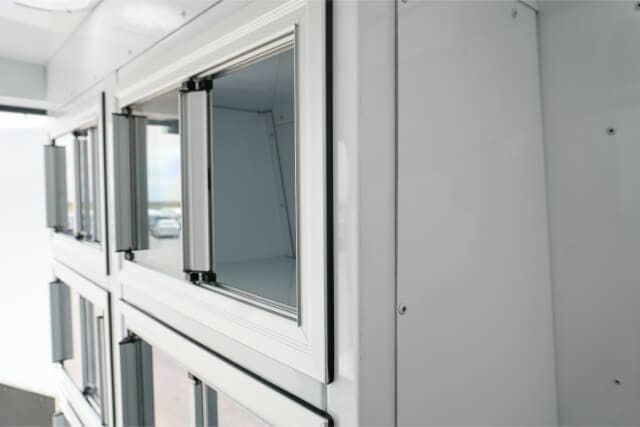
So, how do you handle medical records storage in a mobile medical van? You have to protect two kinds of information: The paper charts in your hand and the digital files on your laptop. Both must be 100% HIPAA-compliant.
A secure mobile clinic typically uses a two-part system to handle this. It’s not about choosing just one. It’s about combining smart physical storage with reliable digital access. Let’s look at both.
Physical medical records storage
First, let’s talk about paper. You will likely have intake forms, patient charts, and clipboards. You can’t just leave them on a desk. This would be a significant gap in physical security.
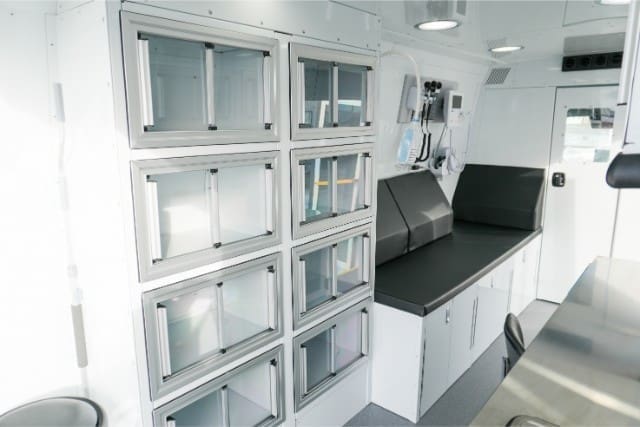
This is where medical records storage in a mobile clinic gets smart. We are not talking about a wobbly metal filing cabinet. You need heavy-duty cabinets that are bolted right into the van’s frame. They won’t slide or tip over when you drive.
The most important part? Locks.
Every drawer or cabinet holding patient information must have a good lock. This is a must-have for HIPAA. This simple step creates a clear, easy-to-follow rule for your staff. If a file isn’t in your hand, it’s locked away.
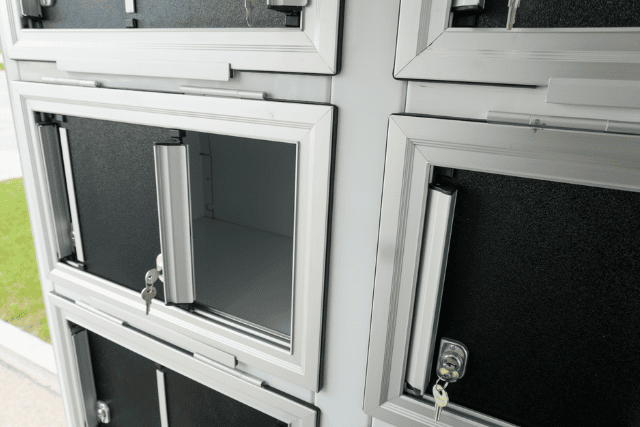
This setup solves a lot of problems:
- It prevents easy mistakes: No more clipboards left on the counter.
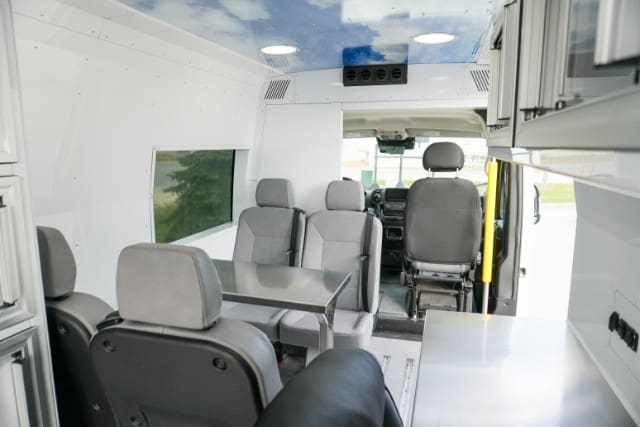
- It’s built for your workflow: With the Mobile Clinic Van, you get overhead cabinets right above the office desk. This means you can finish with a patient, turn, and lock the file away in seconds. It’s simple and safe.
Does tinting help secure medical records storage?
Many organizations that serve busy communities, like those in Miami or Seattle, choose an extra feature: Tinted cabinets. This uses the out of sight, out of mind principle for privacy. The tinting prevents people from seeing inside the cabinet. If a patient is standing near the office desk, they cannot see other patient names or file labels. This adds a critical layer of professional privacy. It shows your community that you take their physical records security seriously, even when the files are nearby.
When you’re in a busy neighborhood in a place like New York City, people are in and out of the van. Your staff is busy. Having dedicated, lockable storage stops a simple mistake from becoming a serious data breach.
How does digital medical records storage work?
Okay, now for the digital side. Most clinics today use a cloud-based EMR (Electronic Medical Record) system. This is great for security.
Why? Because the data doesn’t live on the laptop itself. It’s stored securely online. If someone steals a laptop from the van, they don’t get your patient data. You just log in on a new device. This system also saves you from digging through paper files. The patient’s entire history is right there on the screen.
But here is the big problem. This is the gap everyone worries about.
What happens when you drive to a rural community in Southwest Missouri and the internet connection dies? Your cloud-based system is suddenly useless. You can’t see patient histories or update charts. This is the biggest fear of going mobile.
This is why your internet connection is a key part of your mobile medical records storage. You need a connection that works where cell towers don’t. This is where a system like Starlink comes in. We can customize your mobile clinic with satellite internet. It gives you a strong, reliable connection almost anywhere.
Think about what a stable connection does:
- You get real-time access: Your EMR works just like it does in your main clinic.
- You can update files instantly: No more taking paper notes to sync later.
- You can even do more: A strong connection lets you hold video calls with specialists.
This combination, a secure cloud EMR and a powerful satellite internet system, completely closes the gap. It’s how you get secure, reliable mobile medical unit medical records storage.
Which is better for medical records storage: Physical paper or digital cloud files?
You now know about two different medical records storage methods: Locking up your paper files and connecting to your online records. But which method should you rely on more often? Many healthcare organizations ask: Should we trust the cloud, or should we keep everything on paper in the secure cabinets? Choosing the right primary method closes the largest gap in your operations: Efficiency.
Both methods for mobile medical records storage are HIPAA-compliant when done correctly. However, they each carry different risks and benefits. When you compare them side-by-side, you can see which system best fits your mission.
What are the benefits and gaps of cloud-based medical records?
Cloud files, or your EMR system, are the modern solution for medical records storage in a mobile clinic. They offer security and speed that paper can’t match.
Think about the biggest challenges you face when working with patients. Cloud-based records fix many of them instantly:
- Ultimate security: The greatest benefit is that your patient data is not actually stored in the van. It lives on a massive, secure server somewhere else. If the van is broken into or damaged, your patient data is safe. This eliminates the risk of a huge physical data breach.
- Accessibility: You can instantly access a patient’s full history from the office desk, the exam room, or even back at headquarters. The information is always up-to-date and ready.
- Efficiency and accuracy: There is no need to write notes by hand or worry about messy handwriting. Your team can use standardized forms and templates, which lowers the chance of errors.
The main gap with digital cloud files, as we already discussed, is the internet connection. You must have a strong, reliable connection (like Starlink) to access your files. If the power or internet fails, you can be locked out. That is a risk you must plan for, which often means having a printed backup of the day’s appointments.
Why do mobile clinics still use on-board physical records?
Even with the best digital systems, every mobile clinic needs a plan for on-board physical storage. This refers to the paper files you keep locked in the heavy-duty, tinted cabinets we discussed earlier.
For many organizations, especially those operating in remote rural areas of Texas or the Appalachian region, physical paper is not a primary method, but rather a necessary backup. It fills the gap of absolute connectivity failure.
Here is why physical files are still a part of the mobile medical unit’s medical records storage plan:
- Zero connectivity needed: This is the ultimate safety net. If a storm knocks out all communication, you can still intake a new patient and record basic information.
- Simplicity and familiarity: Some forms are still easier to manage on paper, such as specific consent forms that require a wet signature. Plus, for older patients or some staff members, paper records can feel more familiar and easier to handle during a quick visit.
- Proof of visit: Having a locked-up hard copy of an intake form can serve as fast, immediate proof of service.
The trade-offs, however, are major. Physical records create huge gaps in security and efficiency.
- Space is important: Paper records take up valuable real estate inside the mobile clinic. Every inch used for file cabinets is an inch not used for patient comfort or medical equipment.
- Physical risk: Even locked cabinets can be compromised by a break-in, a fire, or water damage. A physical event can destroy years of data instantly.
- Inefficiency: Dealing with paper slows down your process. Staff must spend time filing, organizing, and securely transporting records back to the main office for digital input. This takes time away from saving lives.
Comparing your options for medical records storage
For most mobile clinics, the cloud is the clear primary choice, providing the greatest efficiency and security. But your mission always determines your tools. If you spend time in zones that have zero connectivity, you must prioritize your secured paper backup.
| Feature | Cloud-based digital files | Physical paper files (on-board cabinets) |
| Primary risk | Loss of internet connection (can’t access) | Physical theft or damage (data destroyed) |
| Efficiency | High (instant access, less time filing) | Low (requires manual filing, slows down process) |
| Space used | Minimal (just the laptop/tablet) | High (requires lockable cabinets) |
| Security handling | Handled by EMR vendor | Handled 100% by mobile clinic staff |
| The gap it fills | Inaccuracy and inefficiency | Absolute loss of internet or power |
Knowing the weaknesses of both options helps you create a robust system. You can then move forward with confidence, knowing you have closed the gap on data loss and chosen the best medical records storage strategy for your team.
Any questions about mobile medical records storage?
You came to this article because the thought of moving patient data onto a vehicle felt risky, and perhaps you were worried about HIPAA compliance, spotty Wi-Fi, and paper files getting lost. You needed assurance that a mobile clinic could actually work.
Here is what you have learned:
- Security is a two-part system: You must secure both your physical files (in lockable, tinted cabinets) and your digital files (using a reliable EMR).
- Connection is key: A system like Starlink bridges the gap and makes your cloud-based medical records storage accessible, fast, and safe almost anywhere.
When you partner with us at AVAN Mobility, you are doing more than just ordering a van. We have spent over a decade working alongside organizations like yours, learning exactly what it takes to launch a life-saving program. If you have any more questions about how to get started, click the button below to talk to a mobility expert.
If you are not ready to talk to a mobility expert yet, we have a few other resources you should check out to learn more:
- How much does a mobile medical unit cost in the U.S.? Reading this article will help you understand the price range you can expect to pay.
- 10 steps to starting a mobile medical clinic: This article will give you a clear, actionable roadmap for turning your idea into a functioning, life-saving program.
- What six factors should you consider when customizing a mobile medical clinic? Reviewing this article will help you understand other things to think about when customizing your mobile clinic.